Showing posts with label Google. Show all posts

Create Free Business Email Address with Google Apps and Namecheap

Google apps is a premium Google service which basically works with businesses providing email address, online storage, shared calenders, video meetings and more. This platform is well known for providing custom email address which is driven by a domain address [i.e. Your company website address] with this format "email@yourcompany.com". You will be given 30GB of storage with 24/7 support capability. Not only you create your business email address but also you can add users to your business so that they can access your services easily.

We will use Namecheap domain provider to perform our custom MX records setup, so if you don't have any domain address under Namecheap [who provides the cheapest and most affordable domain address of the planet] you can get one [Use coupon Code “RAINYDOMAIN” to get special discount] for your own business.
Create Free Business Email Address with Google Apps and Namecheap

Namecheap Offers Special Discount on Domain Purchase [Hot Offer]

Discounted COM, NET, ORG, BIZ Registrations and Transfers

The coupon code entitles you to register or transfer your .com, .net, .org, .biz, .info at the following discounted rates:
  • COM Registration $9.66 + $0.18 ICANN Fee
  • COM Transfer $8.84 + $0.18 ICANN Fee
  • NET Registration $11.32 + $0.18 ICANN Fee
  • NET Transfer $10.52 + $0.18 ICANN Fee
  • ORG Registration $10.21
  • ORG Transfer $9.41
  • INFO Registration and (or) Transfer $9.66
  • BIZ Registration $10.21BIZ Transfer $10.03
Hurry, though – this is a limited time offer and is also restricted to 30 uses per account!

Access Namecheap domain registration page
Use coupon code "RAINYDOMAIN" to get special discount on domain registration

Create Free Business Email Address with Google Apps and Namecheap

1. First of all go to Google apps for work official page and click on “Get started” button

2. Now provide your business name [i.e. Your website name may be], Number of employees [i.e. Quantity of people working under your business], Country/Region [i.e. Your location] and hit “Continue” button
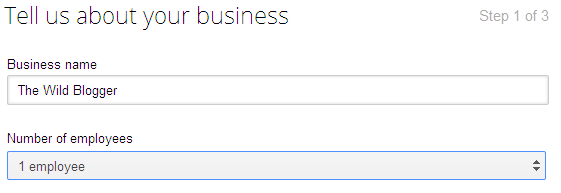
Tell us about your business

3. On step two you have to insert your domain URL with “yoursite.com” format or you can purchase a new domain just at $8/year cost. Now click on “Continue” to proceed
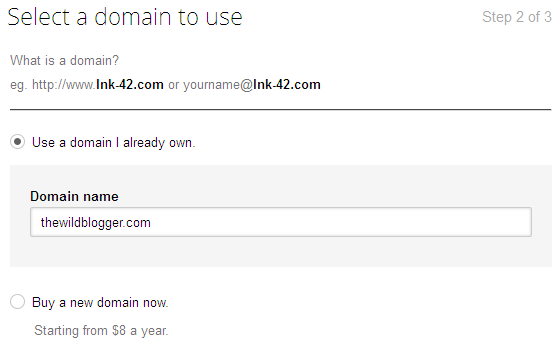
Select a domain to use

4. To create your Google apps account you have to provide your Name, Username, Password, Recovery email address [Email address is used to recover your Google apps account if forget password or username], Phone number, Security verification and click on “Continue” to setup your Google apps account
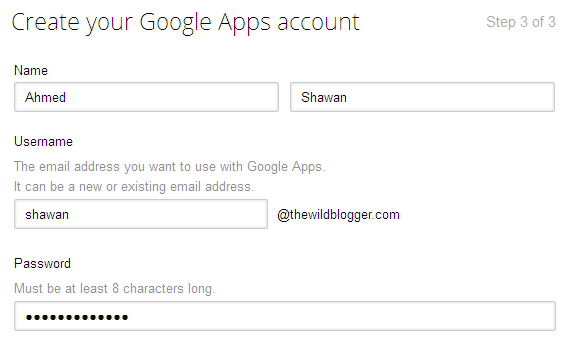
Create Google apps

Verify Domain

5. Now you have to verify your domain address using two separate options [Meta tags, or file upload], in case of my Blogger site verification I have used Meta tags but if you use WordPress then you can upload a file containing Meta tags on public_html folder using FileZilla client or Cpanel file upload option
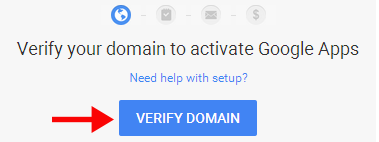
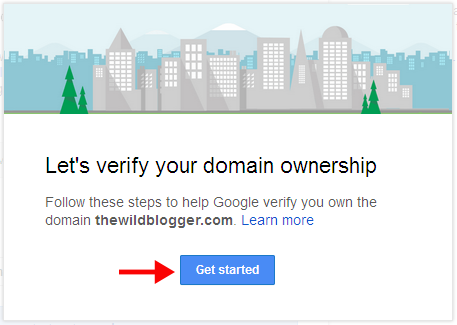
Verify Domain

Let's verify domain ownership

6. So to verify your domain click on “Verify Domain” button then hit on “Get started” and choose two of the following domain verification method. When you will add Meta tag value on your blog or site you must embed it after <head> tag or before </head> tag
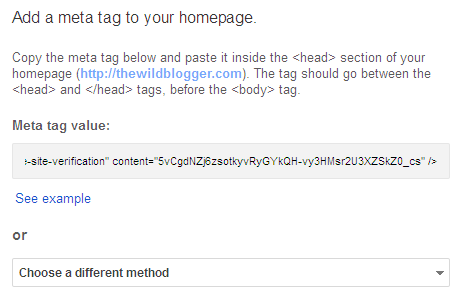
Add meta tag to your website

7. After adding Meta tag value simply check the box says “I have added the meta tag to my homepage” and click on “Verify” button. A popup will say your domain is verified so click on “Continue” to proceed
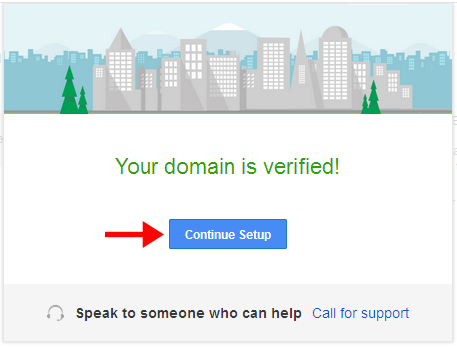
Domain is verified

Create accounts for your team

8. On this step you have to add users here so they can start using apps and services. To add users who are in your circle or Gmail  groups you can add them by clicking on “Add users” link and choose your options to add new users or to skip this step simply click on “Next”

Create accounts for your team

Set up email

9. This is the very important part of our work since you have to setup Gmail with new MX (mail exchange) records under Domain control panel. Not very hard to organize but will take fewer than 2/3 minutes to setup.

10. To continue click on “Set up Gmail” and a popup will say “Let’s get your email up and running” while you have to click again on “Set up email”
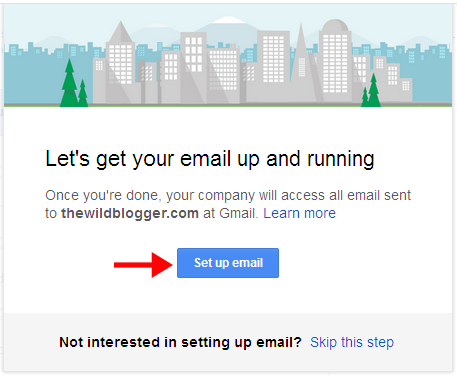
Set up Gmail


Set up email

Domain setup

11. Google apps require you to set up six different options to verify your domain MX records so that all your emails can be directed to your business email connected with a Gmail account under your custom domain address.

12. As we will perform custom MX record setup with Namecheap.com so make sure you have registered domain address under Namecheap.com. If you don’t have any domain address yet then I think you’re missing the cheapest domain service with all available features from Namecheap.

Look what Namecheap provides you:
  • Namecheap runs at $10.69/yr for .com domains [including WHOIS Guard support]
  • Free secured DNS service
  • Personalized custom email address upto 5 emails
  • Auto domain renewal service
  • Live support with 24/7 hours
  • Namecheap is proactive in account security which is absent in many domain register companies
  • And lots of new features, you can check this post for Namecheap special offers
So I think you have namecheap account now login your account and click on “Manage Domains”. Now click on your domain address and navigate to “All Host Records”

13. Here we have to create new custom MX records so scroll down the page a little and check “User (Mail Server’s Host Name Required)” and click on “Save changes”

14. Here all the custom MX records property will go under “Host Name”, “Mail Server Hostname”, “MX Pref” and “TTL”. Before inputting these blank boxes we have to switch “Admin Console” tab of browser to get Custom MX records.
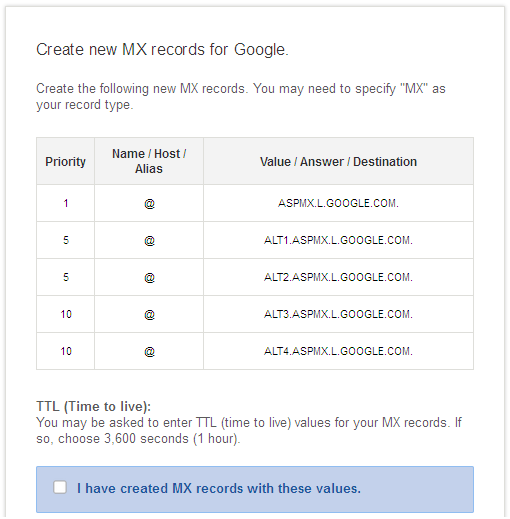
Custom MX records.

15. Now tick first three tabs and with fourth tab which provides MX records values you have to just copy values under “Mailserver Host Name” and put the five values sequentially under “MAILSERVER HOST NAME”
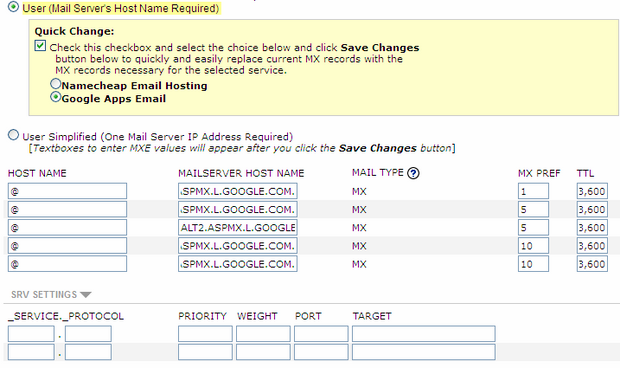
Custom MX records in Namecheap

16. Fill the first column’s blank boxes with “@” character. Then fill “MX PREF” with property values. And “TTL” with “3,600” which is for second.

17. Finally click on “Save changes” and you’re successfully updated Custom MX records in Domain Cpanel.

18. Again switch to “Admin Console” tag of Google apps and tick other two tabs. Later click on “Verify” button and you will see an instant feedback from Google apps that you have successfully created MX records under your domain address.
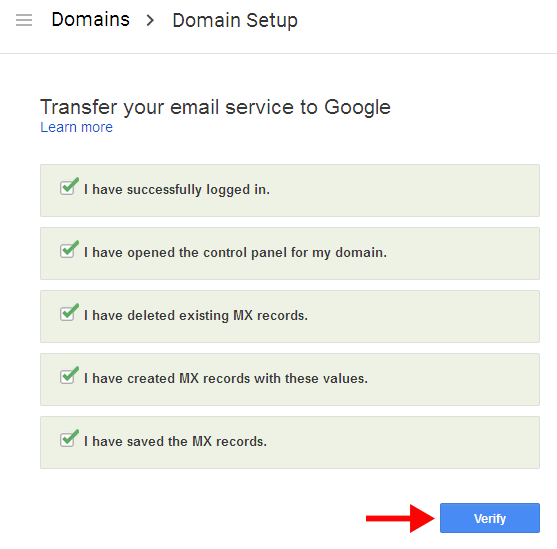
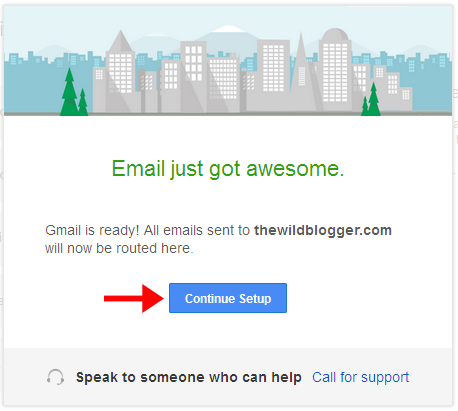
Domain setup

Email just go awesome

Mail setup will take at least 24 hours to be completely verified and you will get notification message once done.

Note: This Google apps service is for 30 days trial period only so if you want a lifetime service then you have to purchase their subscription plans. There are different types of plans Google apps provide according to usability of apps service.

Continue Reading »

11 Awesome Ways to Use Google Search Preferences & Get More Out of It

How many of people in this universe use Google search? − do have any idea? Well let me explain, a recently published infographic by statista has shown "In December, 77 percent of the 1.52 billion search engine users worldwide conducted with Google search at least once a day. That means 1.17 billion Google users, as opposed to 293 million users of Chinese search giant Baidu and 292 million users of Yahoo's search. Microsoft's Bing also cover 267 million searches and Russian search boss Yandex cover 74 million searches each month." By the above statistics it's quite clear that the domination of Google in search engines competition is too strong and far away to reach for other competitors. So if you're like me to get daily doze of tips, tricks, news, and information from Google search then don't you think you should use Google more productively, personally and securely. 

11 Awesome Ways to Use Google Search Preferences & Get More Out of It

Related Article: How to Get More Out of Google Searches ~ Infographic

Of course, right not? So today's of my article I will show you 11 awesome ways to use Google search preferences and get more out of Google search.

1. Change your location on Google

When you're searching on Google the search giant delivers most relevant results near to your location. Suppose you're based on Seattle, so when you search for coffee shops you will see ones that are nearby. Location can be easily updated and set to another.
Continue Reading »

How to Use Google Analytics Intelligence Events and Get More Out of It

Google Analytics is one of the most powerful website analytics and marketing tools which covers almost all of the essential insights(traffic data, bounce rate, landing page redirection, page exit and much more.) of a site helping webmasters to know how productively they can use it to market their businesses so early. Google Analytics uses one effective segment "Intelligence Events" which tracks the important events of a site around a month and report them if any unnatural behavior is found. Today of this tutorial I will go through an indepth guide of using Google Analytics Intelligence Events to track more prominent content of a site and how to make other content same as productive and sharable.
How to Use Google Analytics Intelligence Events and Get More Out of It

What are Google Analytics Intelligence Events?

Google Analytics provides "Intelligence Events" which lets users know any remarkable event taken place on a site like "huge spike" in traffic, "sudden drop" in traffic across any specific Geo location or individual post. Suppose your site normally gets 2000+/- visitors on daily basis but on any sudden date it crossed 5000+ visitors or down by 500 visitors (though any regular site doesn't lose huge traffic unless being attacked by panda or penguin algorithm)
Continue Reading »

Download 11 Free Most Popular Google Apps for iOS & Android

Google apps scripts are most popular toolkit to develop personal apps regarding Google sheets, docs, forms, contacts, slides and more. You can enhance powerful experiences with Google apps scripts since it is an open source project and you can perform any kind of JavaScript task easily. There are 11 most popular Google apps scripts where almost all of those apps can be used on mobile or tablet devices. Google Sheets is a popular tool to design graph, create beautiful drawings and sketch. Google Docs can help you to write text, create visual content, add video, audios and publish on the web or share with your friends. There are lots of other Google apps you will find helpful.

Download 11 Free Most Popular Google Apps for iOS & Android
11 Free Most Popular Google Apps for iOS & Android

Today I will share some of the most popular Google apps you can download free for mobile phones, tablets or even desktop. Let's have them in lists.
Continue Reading »

8 Awesome Ways to Use Google Contacts to Build Your Personalized Emails

Google contacts is a free service allowing users to access and modify email addresses both for individual contacts and groups. The contacts lists are connected with Gmail groups with Friends, Family, Acquaintances, Following, Featured on Google+ etc. Circles. Only those people connected in any of the above circles will be automatically added on Google contacts under Other contacts or Most contacted groups. You can add other email addresses directly from Gmail to Google contacts who are not in your circles. Google contacts can help you to make your email marketing campaign more effective by categorizing individual contacts, showing users details, and more orders.


8 Awesome Ways to Use Google Contacts to Build Your Personalized Emails

Today's tutorial I will show you all how effectively you can use both Google contacts and Gmail to market your email and get more conversion than other social marketing.

Related Tutorial:

1. Keyboard Shortcuts

Google contacts support a handy lists of Keyboard shortcuts both in Desktop and smart phones. To get it done you have to enable Keyboard shortcuts from settings options as well as you can make your Google contacts more personalize by setting up Language, Phone numbers, Max. page size, and Keyboard shortcuts.
Continue Reading »

10 Awesome Ways To Use Google Docs and Get More Out of It

Google docs is a Google Apps script allows users to create, access and modify documents under Google drive cloud storage. The document service of Google is free and easy to access once you have a Google account. You can create dynamic web formats, rich media content, visual content, infographic, text document and more using Google docs. You have wide lists of handy tools that can be used to enrich your document using images, quotes, videos from preferences. Fortunately Google docs allow keyboard shortcuts that are similar to Microsoft Word Document shortcuts so that you can use this service more productively. Also sharing options will help you to instantly share your document with your friends in Google accounts, and other social networks like Facebook, Twitter. You can also embed your document on web pages.


10 Awesome Ways To Use Google Docs and Get More Out of It

Today's of our regular guide I will show you all how you can use Google docs to make your document informative, comprehensive and acceptable.
Continue Reading »

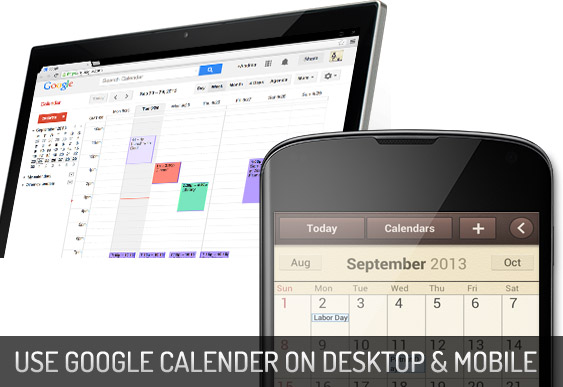
6 Ways to Use Google Calender on Desktop & Smart Phones

Google Calender is a handy application being used millions of desktop users, smart phones, and android devices. The Google calender released as a beta version in July 2009 (after 3 years of it's initialization). To use this service users are required a Google Account in order to use the software. The Google calender is very easy to manage, you can create your own events,create multiple calenders, design your events, share your scheduling with friends in Gmail contacts or Gmail groups, embed your calender on webpages, share your calender RSS feeds, invite guests to your events, edit/remove events and calenders and lots of features available.

6 Ways to Use Google Calender on Desktop & Smart Phones

Today by this tutorial I have gone through all the important features of Google Calender specially focusing on beginners side so that they can understand it easily. I hope you will enjoy the post.
Continue Reading »

Beginner's Guide to Setup Google Custom Search Engine

Google custom search engine is a Google's product which is used on average many websites(small site or big) to increase user experience, provide visitors to quickly search tutorials, generate revenue associating with Google adsense, reduce bounce rate and give an smart outlook to site's front page. It's easy to create a simple custom search engine but it's a bit difficult to create and manage a productive custom search engine which benefits your site in many ways.

Google custom search engine is a complete handy product which you can make a powerful search engine for your site. Exploring site's content, promoting products through ads, showing highly targeted refinements, showing images, reducing bounce rate, providing higher user experience and making money through ads, all these things are maintained by one Google custom search engine—just you need to know how?

Beginner's Guide to Setup Google Custom Search Engine —

Till now i have discussed the benefits of a productive Google custom search engine, but now i'm going to bring you all a complete tutorial of creating a highly useful and productive Google custom search engine that values your brand. Let's begin.
Continue Reading »

Create Google Custom Search Engine & Add To Your Website

Google Custom Search Engine(formerly known as Google Co-op) is a most powerful scripted web search engine which was written in C++ and created by Sergey Brin alongside with Larry Page. It allows web masters and developers to feature specialized information in web searches, re-filter and categorize queries, and create customized search engines based on Google Searches. This service now currently beta tested, with bugs, enhancements and feedback from developers being recorded at "Google CSE Enhancement Page".

Create Google Custom Search Engine & Add To Your Website

This tutorial specially focused on how to create a custom search engine and install on blogspot platform although this service is available on over 50 platforms but as we're talking with blogger so we will move on blogspot users.
Continue Reading »

How to Get a Business on Google Maps Listing - 5 Easy Steps

To every business Google Maps is very popular place to easily reach out over millions of people world wide very quickly through Google Web and Local Searches. Today Google Maps is a complete workspace for service providers where they can easily meet their businesses over thousands of customers(at local time) with real life online business experiences. To inbound marketers Google Maps is also an active way to easily drive traffic up their targeted pages. Most of the people today search for businesses online than anywhere else, so it's important that you make sure your local business listing.
Google Local listing is more valued than a paid online business advertising program where you can register for multiple businesses at a time with only one Google account and all other accessories are totally free in Google Maps for a business accreditation. Google Maps users also can connect Google Pages with their accounts so that it will make customers more flexible to communicate the vendors quickly and simplify transactions.

How to Get a Business on Google Maps Listing - 5 Easy Steps

To make sure enlisting your local businesses also how to get approved with Google Places for Business today we'd show you all a demonstration with detailed guide of Google Business and how to participate for free. All you need just a verified Google Account(Gmail account) and your registered business that you want to enlist and advertise with Google Maps. So Let's Begin
Continue Reading »

11 Awesome Things To Do With Google Drive Cloud Storage!

Google Drive is the most useful free cloud storage where you can do many things around your necessity. Google Drive is considered the most secured, reliable and easy storage device comparing to other alternatives i.e. Dropbox, Skydrive, iCloud, Amazon S3 etc. But within few years Google has revealed lots of extra ordinary supports for Drive users and still now developers working around to make the service more flexible with offering hundreds of most popular apps for Chrome users. Today with this guide I will show you all how exactly you can make G.D fast, easy and a powerful cloud storage for gaming, kidding and developing your internet user experiences. There are 11 different and popular stuffs you can do with Google drive. Let's see they can help you...better.


11 Awesome Things To Do With Google Drive Cloud Storage!
Continue Reading »

26 Google Chrome Extensions That Change Your LifeStyle

I have published many of Google chrome extensions early of the days some were focusing on productivity, some on kids, but you might have heard Google has a giant collections of chrome extensions in their webstore. There are different applications perform different works along with Google chrome browser. Some of them enhance your lifestyle by providing your shopping experiences with eBay, Amazon, Google wallet, giving you out health tips, diet tips, fitness tips and some are to listen you religious tunes from scriptures like Holy Quran, Bible etc.
All these apps are really beautiful and far important to change your daily habits and providing you new age of experiences with internet. Today I will share with you all top 26 best Google chrome extensions to enhance your lifestyle and provide you a great rules of internet UI and UX.

1. Love Calculator

Love Calculator

Love Calculator uses advanced 21st century computational technology to determine in mere seconds your level of compatability with another person. In short, it lets you find out whether that special someone LOVES YOU, too!
Continue Reading »

16 Google Chrome Extensions That Boost Your Productivity

Google chrome is the widest internet browser having a biggest collection of extensions and addons to flexible your internet browsing experience proudly powered by Google Inc. Google chrome is more powerful than any webkit browser like Firefox and others, since they have their own resources of web extensions, tools and big word is that all kinds of Google services are available to one click setup by Google Chrome.
Google's Chrome Web Store is chock-full of cool add-ons for your browser. But, with Chrome gaining popularity, the Chrome Web Store too has become like Apple's App Store: Bloated and hard to navigate. So to save you the trouble, we've found some extensions guaranteed to keep you focused and productive during working hours.

16 Google Chrome Extensions That Boost Your Productivity

Here today we'd share top 16 Chrome extensions to magnify your internet browsing power and give more flexibility in your internet productivity.
Continue Reading »

How to Redirect Google Form Data to Your Personal Email

If you want to create highly optimized contact us form then you have to know such advanced script like JavaScript, PHP, HTML5 etc. but a very good news is that Google drive offers creating Google forms (highly optimized for any site or blog) having multiple flexibilities like creating contact form, complex polls thereby Google forms are the excellent tool and best ever to me.
Creating Google forms are much easy but there is still trouble and that is when a user will send you message the junky snippets will go to your drive form that looks very ugly but if you redirect the message into your personal mail then it will a standard one. With Google script it's possible to redirect form messages into our mail and that is within 5 minutes. Let's see how

First Part: Creating Google Form With Google Drive

Redirecting Google Form Data to Your Personal Email

1. Go to Google Drive and create a contact form using existing Drive Theme or choose any custom theme. Once you have created the form now open form with Google form.

Open google form

2. Inside the form editor click on "View responses" to open Google Spreadsheet that collects responses from Google form.
Continue Reading »

Publish Blog Post to Facebook, Google+ Page Automatically

Blog post syndication is very important terminology to every content creator. What just happens around the dimension of blog but content writer must try to circulate his all of the readers within the blog he is working day and night very hardly. There are a number of tools you can have free on internet to syndicate your blog post feed on different social networking sites i.e. facebook page, twitter, Google+ page etc. platforms.
The importance of social media feed is very prominent because millions of people search for new posts, hot news, new recipes on social media so there exists a probability to attract readers from social media and turn them back into your blog. So social media publishing can help you to do this very much faster when you're busy with writing content.

Publish Blog Post to Facebook, Google+ Page Automatically
Continue Reading »

10 Awesome Kid Friendly Chrombook Apps from Chrome Web Store

Chromebook is being more and more popular specially kids are getting stick to playing new games on Chromebook having available amazing apps from Chrome Web Store and other different sources. You might purchase a Chromebook for your lovely kids now it's time to let them playing and learning new things with these 10 learning apps. Someone will help them to learn solar system in 3D, playing games with mathematics to gain points, learning Mendeleev's periodic advanced table, learning human body organs and much more. Here are 10 that kids ages 4 to 14 will enjoy. Most are touch enabled, and some also work when your Chromebook is offline.

Brainpop Movies

Brainpop Movies

An animated movie app with teen Tim and his robot serve up free five minute movies on topics ranging from asthma to Yo Yo Ma, with different stops in between and clever quizzes. It's a little sample of the entertaining and informative content you would find on Brainpop.com
Continue Reading »

Google Sites: How to Create Dynamic Wiki Style Website Easily?

Google sites based on JotSpot wiki Software is a new service of Google that lets you create and edit websites without learning HTML, CSS or JavaScript. It's a free website builder to create any categorical website for personal, business or blogging purposes. With Google's free collections of themes, templates and tons of widgets have made Google sites more flexible to managing site and publishing content. Newbies may find this platform a little bit crucial since all of its control units remaining on static pages which is not much familiar with other website building platforms. Anyway today we'd show you all how easily and quickly you can create you personal wiki style website for free within less than 5 minutes.

Google Sites: How to Create Dynamic Wiki Style Website Easily?
Continue Reading »

Google Reader Can't Be Replaced - Check Out These Alternatives

It's not quite possible to replace Google Reader, though the service isn't just an RSS reader — it's also the facto cloud-based RSS syncing service. Many of the Google Reader users don't even use the web app as their primary feed reader, instead they use the service which offers subscription, read, unread and folder information to other RSS clients such as Reeder, NetNewsWire and FeedDemon. The services of Pulse and Flipboard while creating a great way to visualize news and information, those services are not much advantageous to the needs of the power Google Reader user.

Google Reader Can't Be Replaced - Check Out These Alternatives

Eventhough we seach for a great list of Google Reader alternatives on internet few more times since we're being very common with this service also other Feed readers work better proving high qulity visual content and full readable credity. Let's meet a great list of Google Reader alternatives which are still being used by a largest group of regular blog and website content readers on internet.
Continue Reading »

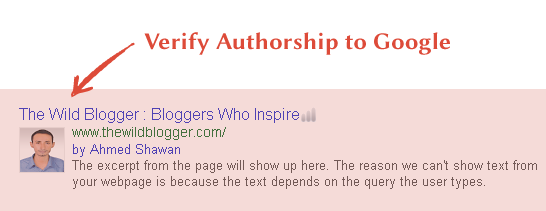
Display Your Profile Picture in Google Search with Verified Google Authorship

Google's new terminology to fetch more flexible and search user friendly data in search results brings webmasters to be more intellectual and internet power based. Google can now display authors profile name with byline "By John Doe" also the profile picture with each link. Google's previous features shown profile picture next to stories that you may have written. The picture will in turn link to your Google Profile page.

Authorship Verified

Continue Reading »

How To Make A Contact Form for Blogger Using Google Drive?

Google Forms is a complete giveaway from Google Drive which helps you plan events, send surveys, give students a quiz, or collect other information in an easy, streamlined way. Google Form is fully developed on HTML basics where it features like as PHP forms and it's an open source project for HTML practitioners. It's an importable survey form builder so you can easily create, edit and publish forms on your custom pages. Google drive gives you a big storage of 15GB data and you have a chance of building multiple apps with their services as it's a freeware web-based offer suite powered by Google Inc. During couple of past months Google drive has extended some dynamic features in their form building tool which lets users to make perfect and accurate forms in which field it will be availed. 


Whatever quite great information we found now let's move on next our tutorial about how to create a basic contact form using Google drive and finally implement that form on blogger. Pretty cool, right not? So let's go ahead and build a contact form for your company website or blog within just some few steps.
Continue Reading »

About

The Wild Blogger is a technology blog which covers all popular and trending news of the web, tech tutorials, blog, blogging tips and tutorials, seo tips, social media marketing, content marketing and tools. Read More...

Browse by Topics

SEO Social Media Make Money

Blogger Tricks Tutorials

Blogging Tips Photoshop